

 Intraoral Scanners
 Scanner Accessories
 3D Printers
 3D Printing Resins & Glazes

Exocad Ultimate Lab Bundle Subscription Option
Get exocad DentalCAD from just $132/month with flexible monthly subscription options for dental clinics and laboratories. Choose from Core, Advanced, Implant and Ultimate bundles, with access to the latest exocad software releases. A lower upfront cost makes it easier than ever to bring professional dental CAD design into your digital workflow.
$990 (exocad setup $321, first month $322, reserve month $322, dongle shipping $25)
Exocad Ultimate Lab Bundle Subscription Option
Product details
Description
exocad DentalCAD is a comprehensive dental CAD software platform widely recognised as one of the world’s leading solutions for digital restorative dentistry. Designed for both dental clinics and laboratories, it provides powerful tools for designing crowns, bridges, veneers, inlays, onlays, implant-supported restorations, complete and partial dentures, bite splints and other advanced dental appliances with exceptional flexibility, speed and precision.
exocad DentalCAD Is Now Available as a Subscription
The Institute of Digital Dentistry is pleased to announce monthly exocad subscription licensing, giving clinics and laboratories a significantly more accessible way to get started with one of dentistry’s leading CAD platforms.
Instead of making a multi-thousand-dollar upfront investment in a perpetual licence, you can now access genuine exocad DentalCAD with a lower initial payment followed by a flat monthly subscription.
Monthly subscriptions include access to the current exocad software release for as long as your subscription remains active, helping you stay up to date without needing to purchase separate upgrade contracts.
This makes exocad an attractive option for practices and laboratories that want to adopt or expand their digital workflow while keeping initial software costs under control.
Monthly Subscription Editions
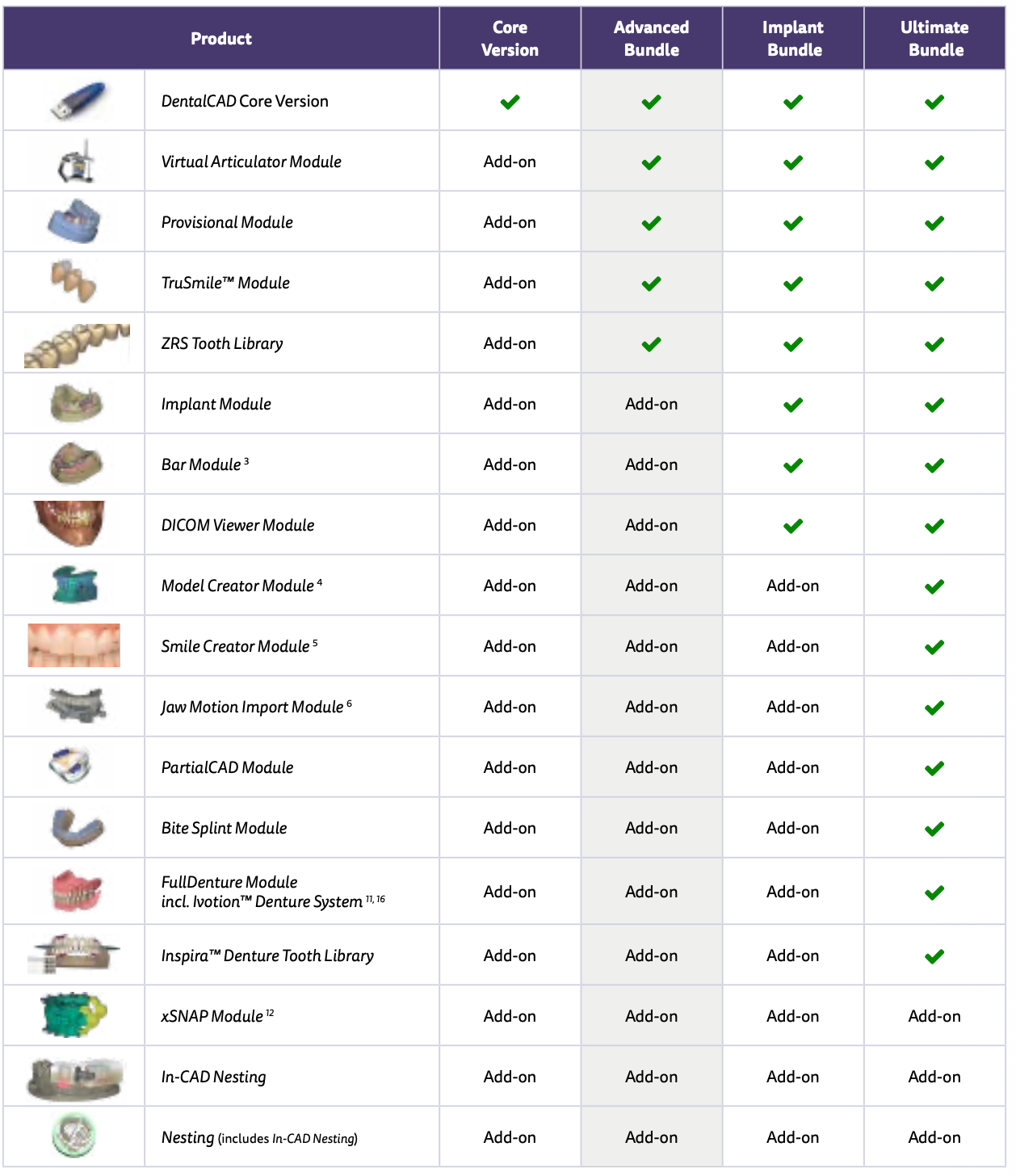
exocad DentalCAD monthly subscriptions are available across several configurations, from essential crown and bridge design through to comprehensive implant, removable and full-service laboratory workflows.
Ultimate Bundle
USD $322/month
Initial fee: USD $965
The most comprehensive DentalCAD subscription for laboratories and clinics wanting access to the widest range of exocad design workflows.
Includes:
-
DentalCAD Core functionality
-
Implant Module
-
Bar Module
-
Full Denture
-
PartialCAD
-
Smile Creator
-
TruSmile
-
Model Creator
-
Bite Splint Module
-
Jaw Motion
-
Virtual Articulator
-
Provisionals
-
Additional advanced DentalCAD functionality
-
30 exocad AI credits per month
How the Initial Fee Works
Your first payment includes:
-
One-time setup and licence provisioning
-
Your first month of subscription
-
A one-month licence reserve
The licence reserve is held to help prevent interruption if a future renewal payment fails.
Your subscription period starts when the licence is activated, rather than when the order is placed. Regular monthly billing begins from the second month.
If you cancel your subscription normally, the reserve is applied to your final month.
Because monthly exocad licences do not have a traditional grace period, cancellation or deactivation may require a new licence and setup fee if you decide to subscribe again later.
Implant Restorations vs Implant Planning
It is important to understand the difference between exocad DentalCAD and exoplan.
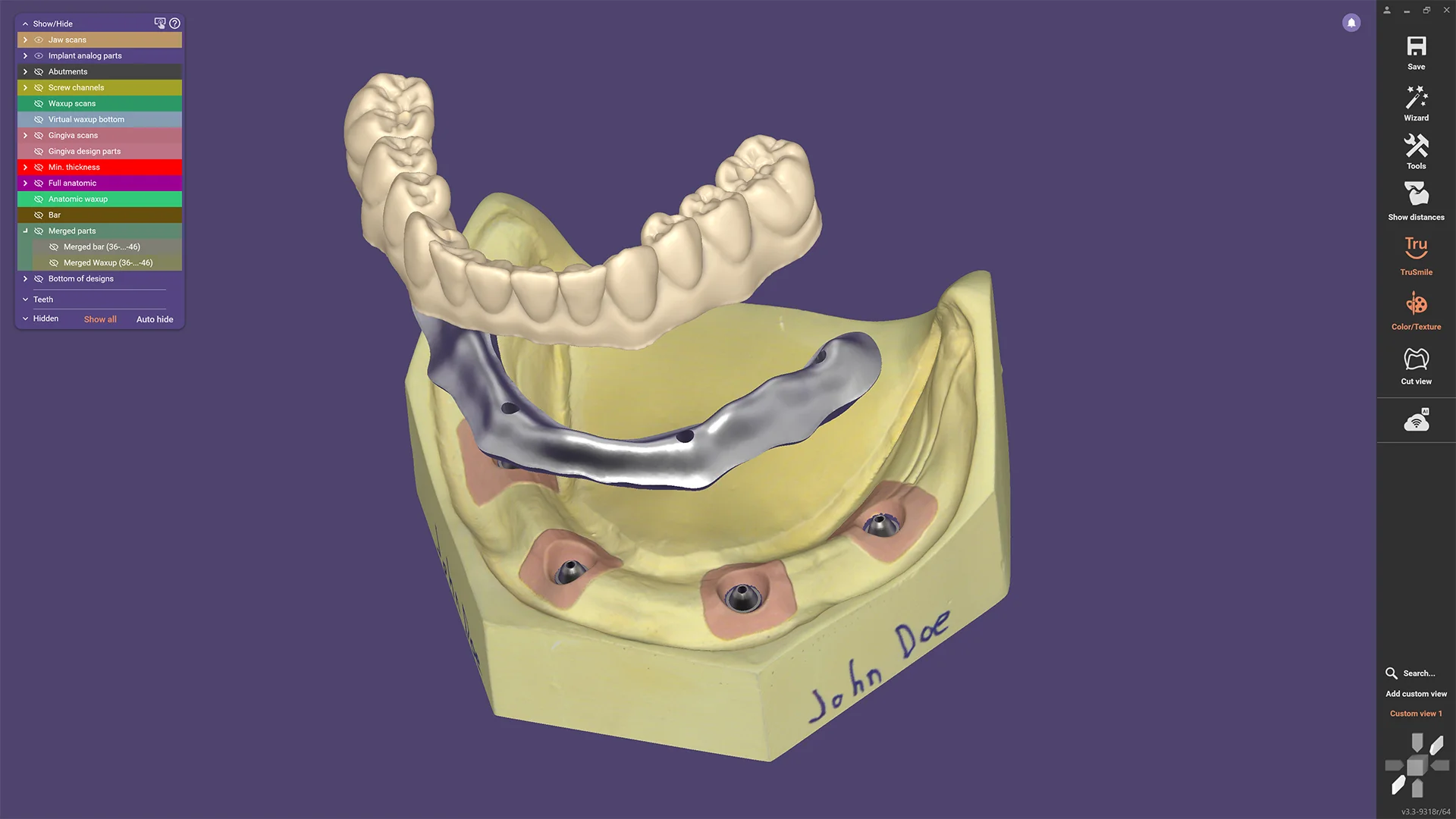
The Implant Module within DentalCAD is designed for creating implant-supported restorations after implant planning has been completed, including custom abutments, screw-retained crowns, implant bridges and related restorative designs.
If your goal is to virtually plan implant placement using CBCT data or design surgical guides for guided implant surgery, you will require exoplan, exocad’s dedicated implant-planning software.
For workflows involving both implant planning and restorative design, you may require both DentalCAD and exoplan.
Our team can help determine the most appropriate configuration for your requirements.
Popular exocad Modules
Depending on your subscription bundle, exocad functionality can include:
-
Implant Module
-
Smile Creator
-
Model Creator
-
PartialCAD
-
Full Denture
-
Bite Splint Module
-
Virtual Articulator
-
Jaw Motion
-
Bar Module
-
TruSmile
-
Provisional Module
-
DICOM Viewer
-
Additional tooth libraries and workflow tools
The modular structure of exocad means you can choose a package based on the cases you currently design and move to a more comprehensive configuration as your workflow grows.
Why Choose a Monthly exocad Subscription?
Monthly licensing is particularly attractive for clinics and laboratories that want to:
-
Significantly reduce the upfront cost of adopting exocad
-
Pay for professional CAD software month to month
-
Maintain access to current exocad software releases
-
Avoid separate Annual Upgrade Contracts
-
Start with the bundle that matches their current workflow
-
Upgrade as their caseload and requirements grow
-
Integrate exocad with existing scanners, mills and 3D printers
-
Avoid being locked into a single hardware ecosystem
For practices considering bringing restorative design, implant workflows or laboratory production in-house, monthly licensing provides a much lower barrier to entry than purchasing a traditional perpetual licence.
Open and Hardware Independent
One of exocad’s greatest strengths is its open architecture.
DentalCAD can integrate into workflows involving a wide variety of:
-
Intraoral scanners
-
Laboratory scanners
-
Milling machines
-
3D printers
-
Dental manufacturing systems
This allows you to choose hardware based on your clinical or laboratory requirements rather than being locked into one manufacturer’s ecosystem.
Monthly vs Flex vs Perpetual
Monthly subscriptions add another option alongside exocad’s existing licensing models.
Monthly Subscription
A lower-cost entry point with an initial setup payment followed by a flat monthly fee. Ideal for clinics and laboratories wanting flexibility and minimal upfront investment.
Annual Flex
An annual subscription model for users who prefer to plan and pay for their software on a yearly basis.
Perpetual Licence
Purchase the software licence outright and continue using your purchased version indefinitely. Future upgrades can be obtained separately if required.
The best option depends on your budget, expected length of use and preferred approach to software ownership.
System Requirements
exocad DentalCAD requires:
-
Windows 10 or newer
-
16 GB RAM recommended
-
Dedicated graphics card with OpenGL support
-
Internet connection for activation and ongoing licence validation
-
exocad USB licence dongle
-
Compatible my.exocad account
Hardware requirements can vary depending on case complexity and the modules being used. Contact us if you would like assistance confirming whether your current workstation is suitable.
Not Sure Which exocad Subscription You Need?
Choosing an exocad configuration can be confusing. Different bundles, modules and implant-planning options can make it difficult to determine exactly which package is right for your practice or laboratory.
The Institute of Digital Dentistry can help you choose and configure the most appropriate exocad subscription.
Our team can assist with:
-
Selecting between Core, Advanced, Implant and Ultimate
-
Determining whether you need DentalCAD, exoplan or both
-
Selecting the appropriate restorative and implant workflows
-
Understanding which modules are included in each bundle
-
Compatibility with your intraoral or laboratory scanner
-
Compatibility with milling machines and 3D printers
-
Existing exocad licence upgrades and configuration changes
-
Building a complete digital restorative, laboratory or implant workflow
Contact the Institute of Digital Dentistry before purchasing if you’re unsure which option is right for you.
We’ll help you select the most suitable and cost-effective exocad subscription based on your workflow, equipment, caseload and future plans, so you get the functionality you need without paying for capabilities you don’t.
Training Every Step of the Way
iDD is more than a supplier — we’re your digital dentistry partner.
When you invest in products with us, you’re investing in a complete transformation for your clinic or lab. We use this technology every day, and our expertise becomes your advantage. Every purchase includes access to our online training and ongoing support to ensure you achieve real success with your new equipment.



FAQs
Please read our FAQs page to find out more.
When will my order be shipped?
Orders are typically processed within 1–3 business days after purchase.
Once your order has been dispatched, you will receive a confirmation email with tracking information.
Please note that processing times may be slightly longer during peak periods or product launches.
How long will it take until I receive my order?
Typically, orders are delivered within 2–6 weeks, depending on product availability. We are committed to ensuring your order reaches you as quickly and smoothly as possible.
In the meantime, you will receive complimentary access to iDD’s world-class Digital Dentistry CPD/CE online education, so you can continue learning while you wait.
Can I speak to someone?
Yes, please book a time to speak to our sales consultant here.
What is your return policy?
Click here to read all our policies